
A store owner once managed inventory manually. Every sale got subtracted from a spreadsheet, and every restock got added back. The system worked fine at twenty orders a week. Then sales picked up, and the spreadsheet could not keep pace. Overselling became a weekly problem, and customers started receiving emails about items that were no longer in stock. The owner realized the manual approach was never going to work at scale.
The answer was not working harder in the spreadsheet. It was connecting the store to the warehouse. When WooCommerce and the fulfillment system talk to each other, the inventory updates happen automatically. Every sale, every restock, and every return flows between the two systems without anyone typing a single number. The store stays accurate, and the customers stay happy.
How to Sync WooCommerce Inventory with 3PL and What the Integration Actually Does
Understanding how to synchronize WooCommerce inventory with 3PL comes down to the process itself. Once the order from the customer is received, the information about it is passed from the store to the fulfillment service. The item is chosen from the warehouse, packed, and shipped. The very minute that the product is shipped from the shelf, the stock levels are adjusted accordingly.
WooCommerce fulfillment services that offer deep integration make this process invisible. The store owner does not log into two dashboards and manually compare numbers. The systems stay in sync automatically, and the owner watches a single source of truth.
Look at how the workflow operates with a guide on WooCommerce fulfillment that covers the full order process.
From Order to Delivery: Fulfillment Flow
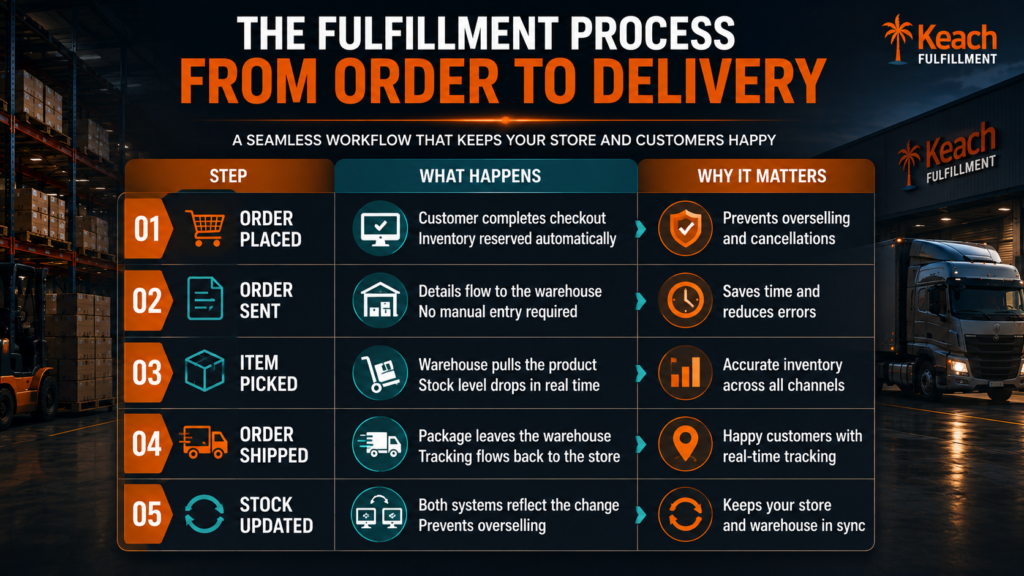
How WooCommerce Sends Orders to Fulfillment Centers and What the Customer Sees
WooCommerce order fulfillment process is intended to go without any problems for all parties. The order appears on the list immediately after the customer completes checkout. The warehouse staff sees the pick list and starts working. The customer gets confirmation of the order and then the tracking number.
Good WooCommerce order fulfillment services make sure that the customer does not have any doubts about what happens with their order at all times. The tracking notifications appear automatically, and the shipment arrives right on time. The store owner stays out of the loop completely.
Keach Fulfillment syncs WooCommerce inventory in real time so you never oversell.
Give us a call now!WooCommerce Stock Sync with Fulfillment Warehouse and What Happens During Restocks
The WooCommerce stock sync with Fulfillment Warehouse connection is not just about subtracting sales. It also handles incoming inventory. When a restock shipment arrives at the warehouse, the receiving team counts the products and updates the system. The store immediately shows the new available quantity.
WooCommerce fulfillment services that manage this well keep the store accurate during both fast and slow periods. The restock updates happen automatically, and the store never misses a sale because the inventory count was outdated. For stores that sell across multiple channels, the sync keeps every platform consistent.
Understand how bundles fit into the inventory picture through this blog on WooCommerce product bundles.
&
For understanding the full automation picture, our piece on WooCommerce order fulfillment helps explain the workflow from click to delivery.
WooCommerce Automated Inventory Sync and Why It Prevents the Overselling Nightmare
The value of WooCommerce automated inventory sync is most visible when sales spike. A flash sale or a holiday rush can push order volume far beyond what a manual system can handle. Without automation, the store oversells, and the customer service inbox fills with complaints.
WooCommerce fulfillment services with automated sync absorb the spike without breaking. The inventory updates in real time, and the store stops selling items that are no longer available. Customers only see accurate stock levels, and the overselling nightmare never happens.
See how fulfillment compares to other models with our guide on fulfillment versus dropshipping, which covers the tradeoffs.
A Store That Never Guesses About Stock Levels
Inventory accuracy may be boring work, but it is the key to creating a successful e-commerce company. The business that knows how much of each item is in inventory can confidently offer the product. The one that only guesses at inventory will only have to apologize to their customers later.
We provide WooCommerce fulfillment services with real-time inventory sync. The store and the warehouse stay connected, and the stock levels stay accurate. The business grows without the growing pains that come from manual inventory management.
Keach Fulfillment links your WooCommerce store to a warehouse that stays updated.
Reach out and stop guessing about stock levels.