
Buying software feels risky. You invest time and money. The sales team promises amazing results. But will it actually work for your business? A warehouse management system represents a significant decision. Getting it right transforms your operations. Getting it wrong wastes resources and frustrates your team. This checklist helps you evaluate options confidently. We cover essential features, typical costs, and realistic ROI expectations.
Use this checklist to evaluate options confidently.
Check out Fulfillment now!What Key Features of Warehouse Management Systems Should You Look For?
Key features of a warehouse management system vary by vendor. Some features matter for every business. Others only apply to specific situations.
Barcode scanning
Barcode scanning tops the essential list. Your WMS must support handheld scanners or mobile device cameras. Manual data entry creates errors. Scanning eliminates them.
Real-time inventory updates
Real-time inventory updates follow closely. When a product arrives or ships, your counts should change immediately. No batch processing. No daily updates.
Pick path optimization
Pick path optimization saves significant time. The system should group orders efficiently. Pickers walk less and pick more.
Integration capabilities
Integration capabilities determine how well your WMS connects to other tools. Your shopping cart, accounting software, and shipping carriers should all connect seamlessly.
Reporting and analytics
Reporting and analytics help you improve over time. Look for dashboards showing pick rates, order accuracy, and inventory turnover.
What Is the Typical Warehouse Management System Cost?
Warehouse management system cost varies widely based on deployment method and business size. Cloud-based systems charge monthly subscriptions. Expect to pay between two hundred and one thousand dollars monthly for most small to medium businesses. This includes software updates and customer support.
Larger operations might pay five thousand dollars or more monthly. These systems handle higher-order volumes and include advanced features like labor management. One-time costs also matter. Implementation fees range from three thousand to twenty thousand dollars. This covers setup, data migration, and staff training. Hardware adds another expense. Scanners, printers, and labels might cost two thousand to ten thousand dollars upfront.
Calculate your potential savings before you buy.
Get ROI Estimate todayHow Do You Calculate Warehouse System Management ROI?
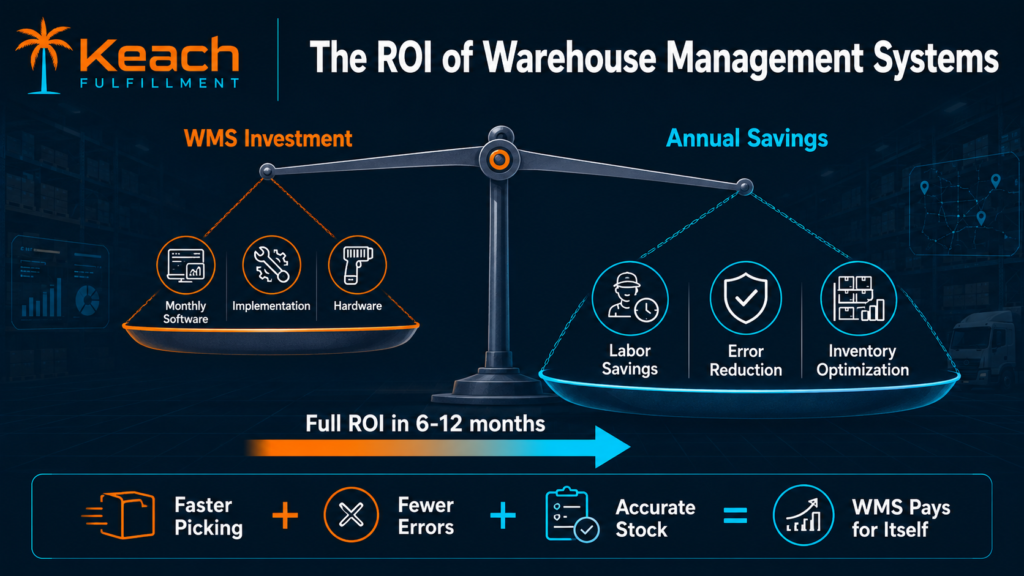
Warehouse system management ROI comes from multiple sources. Each area contributes to your bottom line. Labor savings often provide the largest return. A good WMS cuts picking time by thirty to fifty percent. Staff processes more orders in fewer hours.
Error reduction saves money, too. Each wrong item costs return shipping, replacement product, and customer goodwill. Cutting errors from two percent to half a percent saves thousands monthly. Inventory accuracy prevents stockouts and overstock. Accurate counts mean you order the right amount at the right time. Less cash sits on shelves unnecessarily.
Space utilization improves with organized storage. You might delay or avoid renting additional warehouse space. Add these savings together. Many businesses recover their entire WMS investment within six to twelve months.
What Questions Should You Ask WMS Vendors?
Before signing any contract, ask these specific questions.
- Which integrations do you offer natively? Avoid vendors requiring custom development to connect your shopping cart.
- What is your uptime guarantee? Look for 99.9 percent or higher. Your WMS cannot go down during peak season.
- How does your support work? Confirm they offer US-based support during your operating hours. Overseas support, due to time zone differences, creates delays.
- What training do you provide? Some vendors offer unlimited training. Others charge extra.
- Can you provide client references? Speak with businesses similar to yours. Ask about implementation challenges and ongoing support.
In our previous guide, Warehouse Management Systems Explained Without the Technical Jargon, we covered the basics of WMS functionality. This checklist builds on that foundation with practical evaluation criteria.
Do You Really Need to Buy a WMS?
Not every business needs to purchase its own warehouse management system. Small operations with under two hundred products might manage with basic tools. Spreadsheets and simple picking lists work at low volume. However, partnering with a professional fulfillment center like Keach Fulfillment gives you WMS capabilities without buying software yourself.
Our warehouse system management technology powers your fulfillment. You access real-time inventory data through your dashboard. You never install or maintain anything. This approach works especially well for growing brands. You gain enterprise-grade technology without enterprise-grade investment.
Wrap Up
A warehouse management system transforms chaotic warehouses into efficient operations. The right system pays for itself through labor savings, error reduction, and better inventory accuracy.
Use this checklist to evaluate your options. Focus on essential features like barcode scanning and real-time updates. Understand all costs, including implementation and hardware. Calculate a realistic ROI based on your specific operation.
At Keach Fulfillment, our warehouse management system powers accurate, fast fulfillment for ecommerce brands. You gain the benefits of advanced WMS technology without managing software yourself.
Let our technology power your fulfillment.
Contact Keach Fulfillment