
A store owner once noticed something strange. The Shopify dashboard showed fifty units in stock, and the warehouse said forty, and the actual count on the shelf was thirty-seven. The numbers had drifted apart slowly over weeks, and now the store was overselling inventory it did not actually have. Customers were ordering products that could not be shipped.
The culprit was the 3PL warehouse management system, and the sync between the store and the warehouse had broken somewhere. The problem felt invisible until it became a customer service disaster. Real-time inventory sync is supposed to prevent exactly this kind of mess. When it stops working, the business starts guessing, and the customers start complaining.
What Causes a 3PL Warehouse Management System to Stop Syncing?
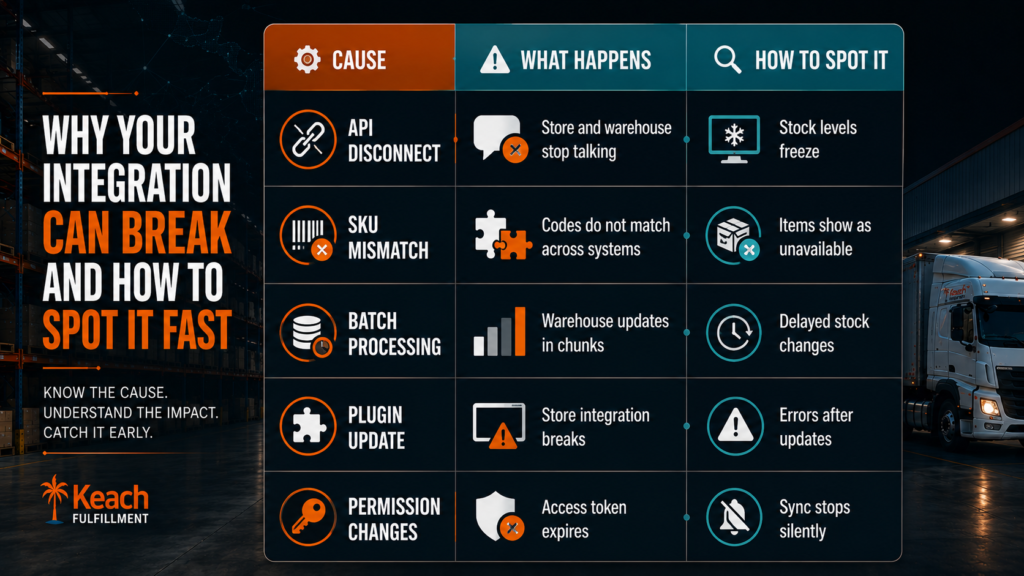
The warehouse management system in a 3PL service operates under the assumption that there will be connectivity between the store and the warehouse. Connectivity is normally made through an API, which normally works perfectly well until anything changes, like plugins, permissions, or field mappings. Errors in the warehouse management system api keep accumulating, and the sync stops, but nobody notices.
Causes of delay in synchronization of 3PL WMS inventory can include outdated software versions, mismatched SKU codes, and throttled API requests during high activity. Delay in synchronization of 3PL WMS inventory can also be due to the batching of order processing in the warehouse instead of in real time. Inventory levels in the store may be several hours or even days behind schedule.
Curious how the right provider avoids these problems? This guide on choosing a 3PL covers the questions that reveal reliability.
Common Causes of Inventory Sync Failure
Real-Time Inventory Sync Issues and Why They Hurt the Business
The real-time inventory sync issues that hurt most are the ones that go unnoticed. The store keeps selling, and the warehouse keeps shipping, and the numbers slowly drift apart. Then a customer places an order for a product that is out of stock, and the store has to apologize and issue a refund. The apology costs more than the refund.
A 3PL warehouse management system that syncs properly prevents that moment. The stock levels update the instant an order comes in, and the instant a restock arrives. The store always knows what is available, and the customer never hears the word backorder.
Keach Fulfillment uses a warehouse system that updates stock in real time.
Know what accurate inventory looks like.How to Fix 3PL WMS Inventory Syncing Errors and Where to Start
The process of fixing 3PL WMS inventory syncing errors starts with identifying where the break happened. Check the API connection, the access tokens, and the plugin version. Look for SKU mismatches between the store and the warehouse. The answer is usually in one of those places.
The fix often involves reconnecting the integration and updating the field mappings and running a full inventory reconciliation. A 3PL warehouse management system that has proper logging makes the diagnosis faster. The error reports show exactly where the sync broke and what needs attention. If the provider is not helping with this, the partnership itself might be the problem.
Why 3PL Stock Levels Not Updating Shopify and What to Check First
The issue of why 3pl stock levels are not updating Shopify usually traces back to a few common culprits. The Shopify integration token expired, and the system can no longer read the store data. The SKU codes do not match between the store and the warehouse. The webhook that triggers the update got disconnected during a plugin update.
The troubleshooting starts with those three checks, and the fix is usually quick. A 3PL warehouse management system that is properly maintained prevents these issues from happening in the first place. The best providers monitor the integration and catch problems before the store owner ever sees the symptoms.
If the provider has already caused damage, this blog on handling fulfillment mistakes covers the recovery process.
A Sync That Keeps the Store Honest
Inventory accuracy is not a luxury. It is the difference between a store that sells with confidence and a store that apologizes for overselling. The right warehouse system keeps the numbers aligned and the customers happy. The store owner stops guessing and starts growing.
We provide a 3PL warehouse management system that syncs in real time and keeps the store accurate. The integration is monitored, and the errors get caught before they become problems. The numbers stay aligned, and the business runs smoothly.
Let Keach Fulfillment handle your inventory with real-time accuracy.
Schedule a consultation and stop fighting with stock level ghosts.